How to connect external SQL clients to Amorphic?

info
- Follow the steps mentioned below.
- Total time taken for this task: 30 Minutes.
- Pre-requisites: User registration is completed, logged in to Amorphic and role switched
Tidbits
- Amorphic has a switch
DWHPublicAccess. This can be turned on or off, depending on the company's security policy. - SQL Clients can be connected only if
DWHPublicAccessis turned on.
Download and install 'SQL Workbench'
- Click here and click on
Downloadsfrom left-side menu. - Click on the link
Generic package for all systems including all optional libraries (sha1). - Unzip the archive into a directory of your choice. Apart from that, no special installation procedure is needed. For any specific configurations, click here
- For Mac, Click on
Creating a macOS executableand follow instructions.
Download Redshift Driver
- Click here to go to Redhift JDBC drivers page.
- Click on the link
JDBC 4.2–compatible driver (without the AWS SDK) and driver dependent libraries for AWS SDK files. - Unzip the archive into a directory of your choice.
Run SQL Workbench and create connection for Redshift
- Double click
SQLWorkbench64.exein windows to start the application. - Click on
Create a new connection profile. - Rename
New ProfiletoAmorphic-Redshift-Connection. - Click on
Manage Driversat the bottom left corner. - Click on
create new entry icon🗎. - Change
New drivername toAmazon Redshift. - Click on
Select the JAR file(s) that are needed for the JDBC driver. - Select all the JAR files from the Redshift JDBC driver folder as shown below. Click OK.
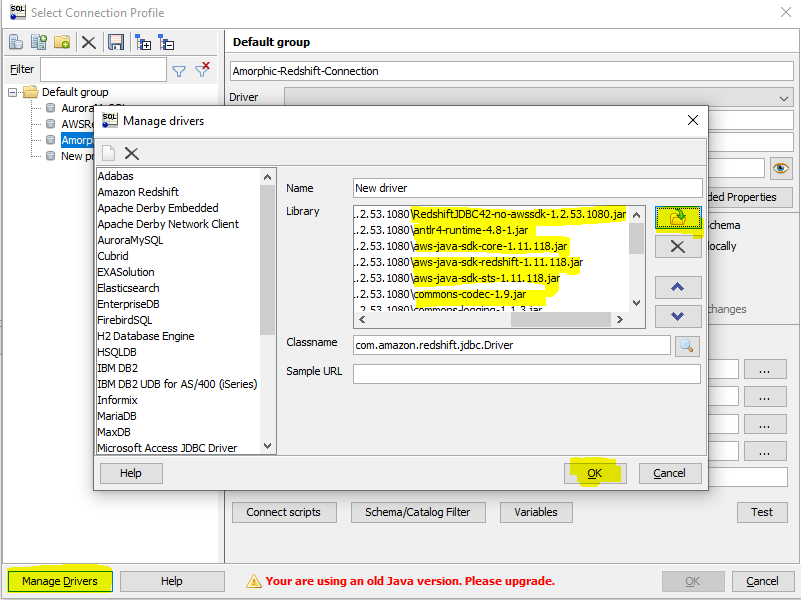
- Click on
Driver'sdropdown list to selectAmazon Redshiftdriver. - Go to
Profiletab of any Amorphic dataset withRedshiftas aTarget Location. - Copy the JDBC connection string as shown below.
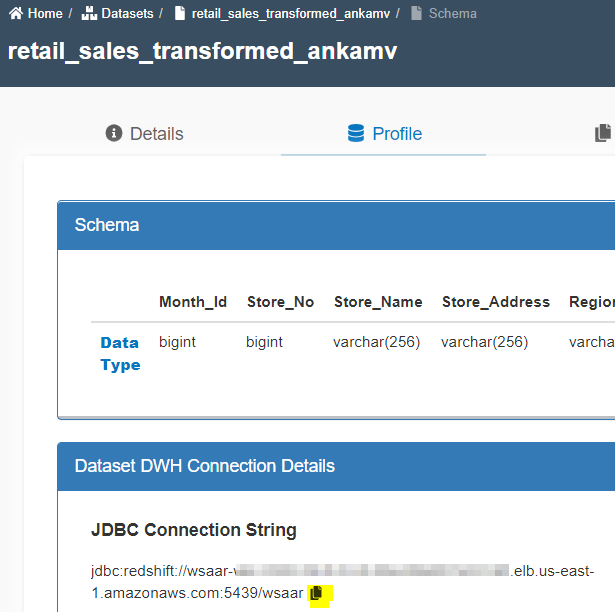
- Paste it in the URL text box of SQL Workbench connection profile.
- Get your username and password from 👤 icon at top right corner --> 'Profile & Settings'.
- Click on
Reset DWH Passwordas shown below.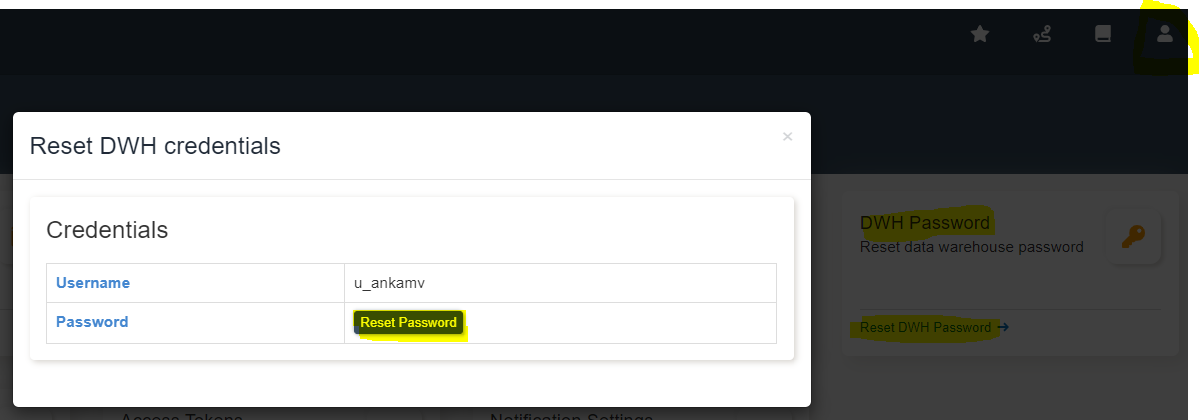
- Paste username and password in SQL Workbench connection profile.
- Click on
save💾 icon. - Click on
Test. You must get `Connection to jdbc:redshift://... successful' message. - Click OK to get into the SQL Workbench explorer.
- You may expand
workshopschema andtableon the left side box. You will see all amorphic datasets as tables. But, you will be able to query only those datasets with Redshift as target. - Write a sample SQL and click on execute.
tip
Explore other features of SQL workbench now.